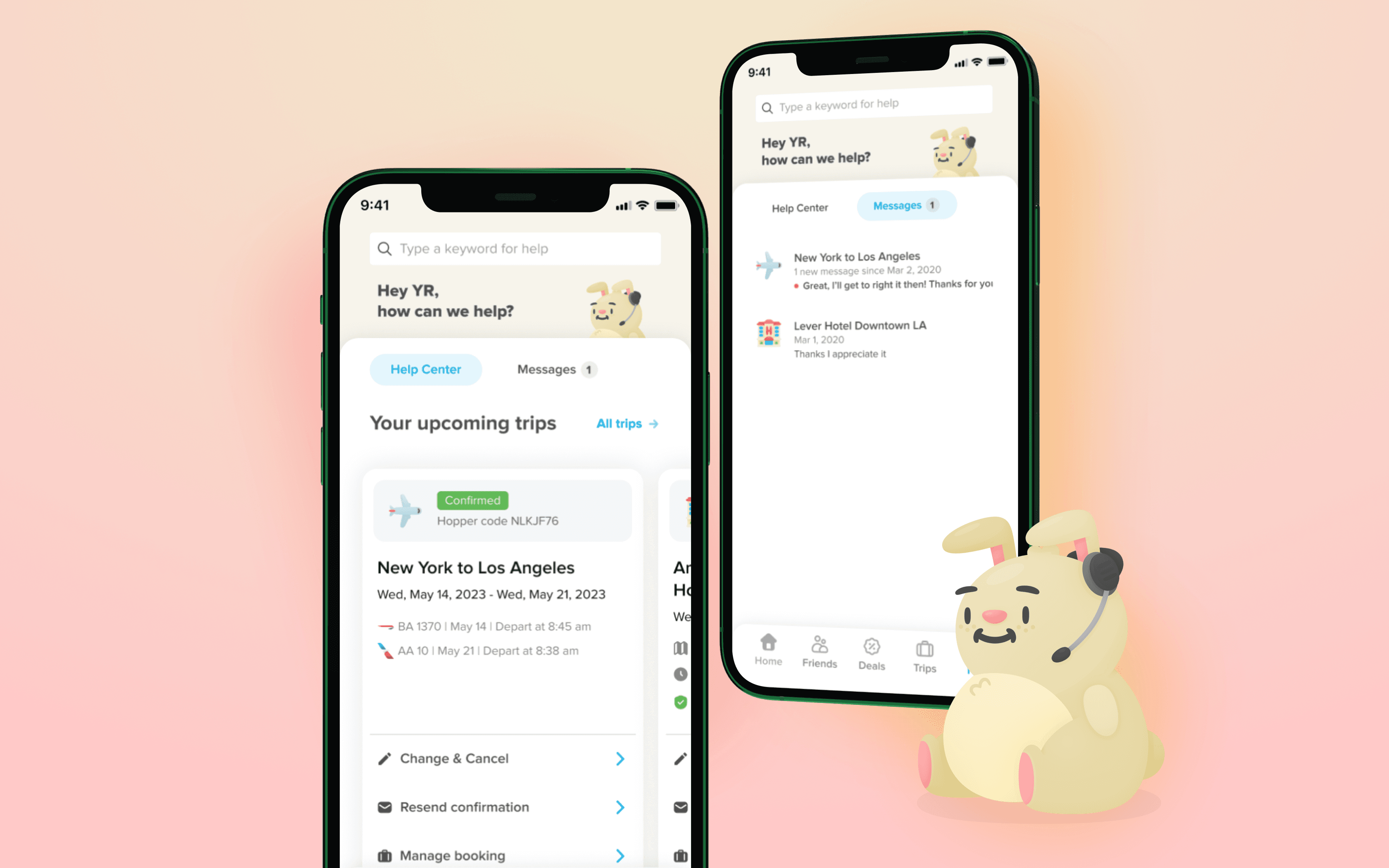
A complete redesign that lifted self-service resolution by 59%, and gave the Help Center a visual and motion language that finally felt like Hopper.
A Delightful New Help Center Experience
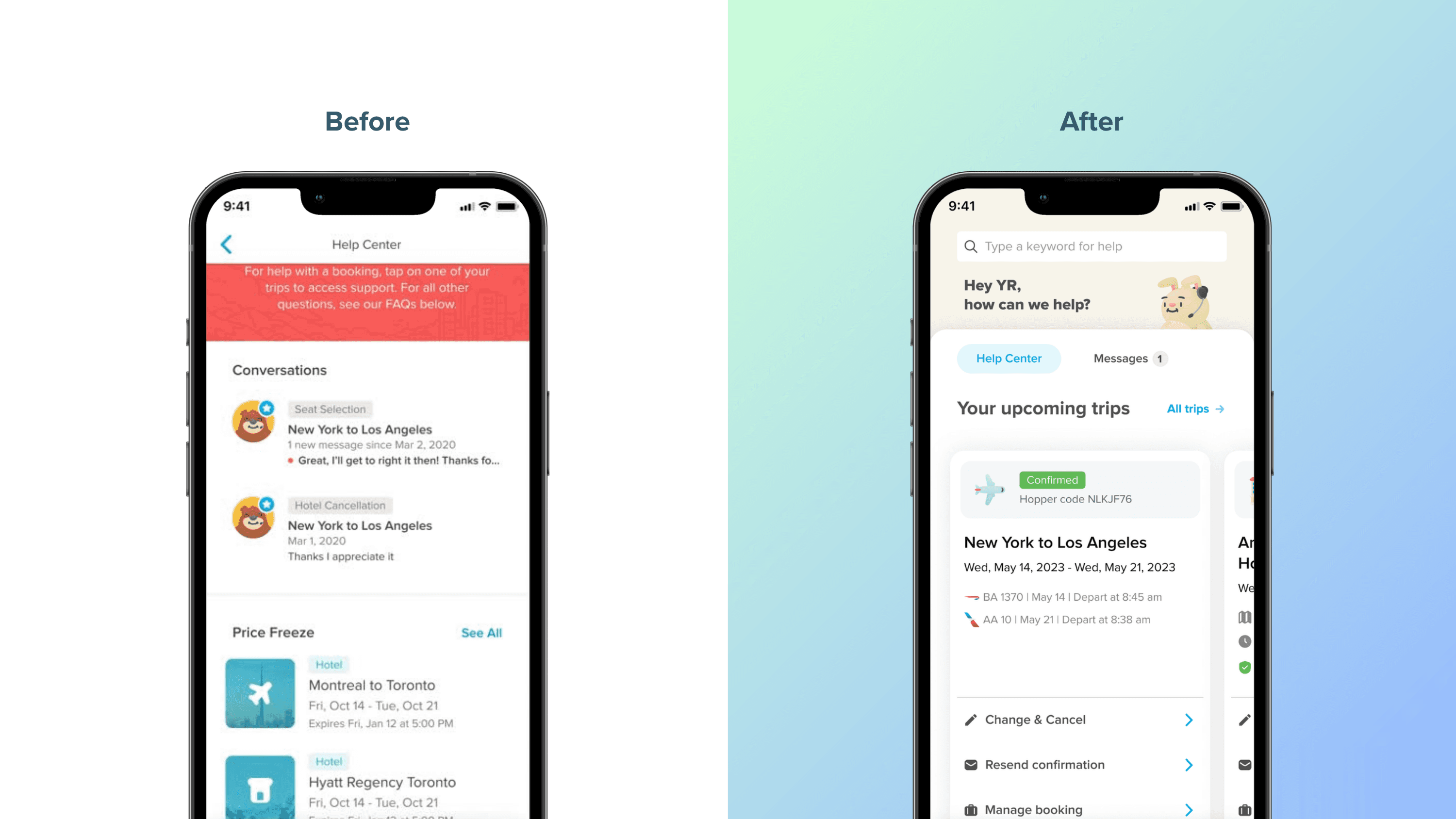
A 22% self-service rate, and a support team stretched too thin to keep up
As one of the top three flight booking platforms in North America, Hopper's lowest customer satisfaction score consistently fell in one area: customer service during disruptions. Despite significant investment in support staffing, the root problem ran deeper. With only 22% of users able to resolve issues on their own, the vast majority escalated to human agents, making it impossible for the support team to serve everyone effectively.
Outcomes
Redesigning the holistic Help Center experience to lift self-service and deliver brand trust
I redesigned Hopper's Help Center end-to-end across iOS and Android, with two ambitions held in tension. First, lift the self-service resolution rate. Second, use the surface itself to deliver Hopper's brand promise — that the app is here to take care of you.
Impact
+59%
in self-resolution
Online-service resolution rate climbed from 22% to 35% (59% increase) — meaning thousands more users every month resolved their own issues without contacting a support agent.
+11%
in FAQ engagement
FAQ usage rose from 38% to 42% as users found context-relevant answers right inside their booking flow.
−17%
in support tickets
Support ticket volume dropped from 78% to 64% of disruption inquiries — freeing the support team to focus on the cases that genuinely needed a human.
I designed and led a mixed-methods research plan, recruiting directly from Hopper's own user base. Starting with a pre-survey of 385 app users to identify patterns at scale, I hand-selected 6 participants for in-depth interviews, screening across trip length, travel context, and purchase behavior.
On the quantitative side, a Maze survey of 98 respondents validated where users dropped off and which self-service options they weren't aware of. The most frequent challenge surfaced was flight disruption — the scenario where a competent help center matters most, and the one the existing design served worst.
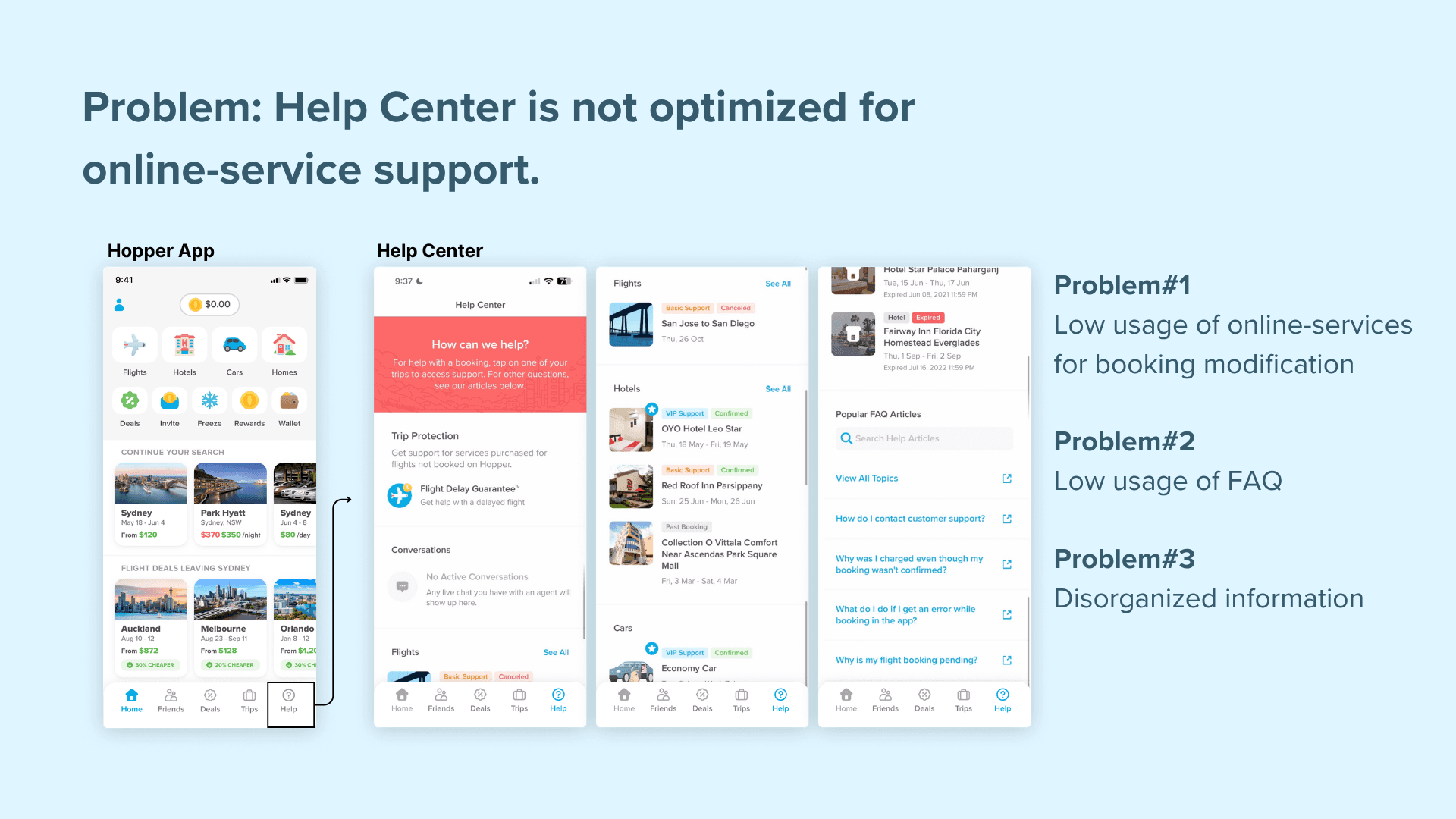
Research showed that the low customer support satisfaction and low self-serve completion rate came from the disorganized IA, which resulted in the customer trust issue.
Low self-service usage
No explicit modify-booking actions, and free cancellation status was buried below the fold. Only 22% of users could resolve a flight disruption on their own.
FAQ disengagement
Only 38% consulted the FAQ before contacting support. The content was generic and didn't match real booking scenarios.
Disorganized information
Past, expired, and active bookings were mixed with add-on products in a single feed. Users couldn't quickly find the trip they actually needed help with.
Reorganized the Help Center around four design moves, each one solving a specific gap from the research.
How might we enable users to smoothly resolve their issues, and foster trust in Hopper's customer support?
The goal had two halves. Smooth resolution is the functional half, solvable through information architecture. Trust is the emotional half, solvable through how the surface feels under your finger.
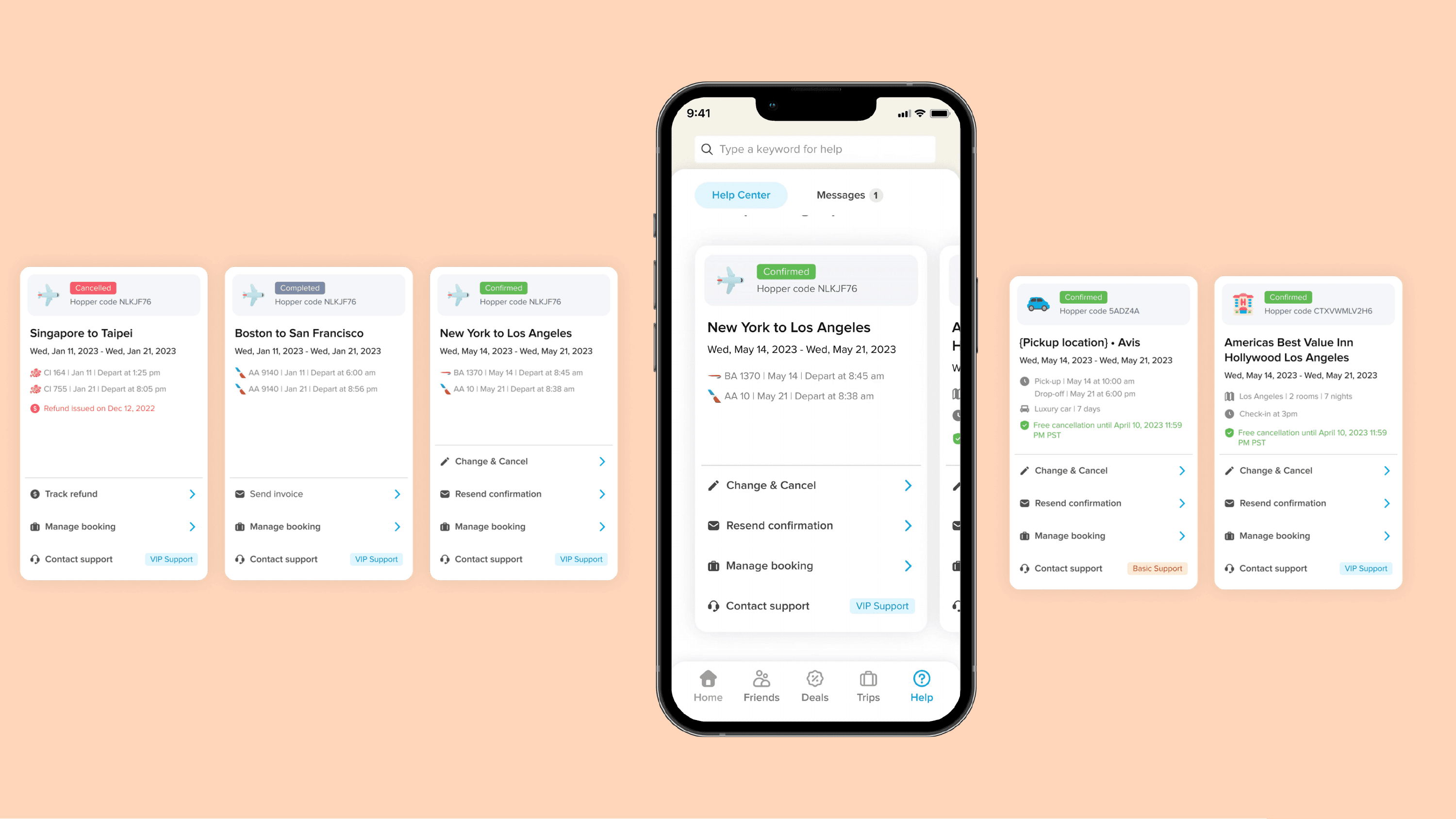
Surfacing the trip as the primary unit
The category-based feed was replaced with a horizontal carousel of upcoming trips. Each card surfaces its own contextual actions inline — Change & Cancel, Resend Confirmation, Manage Booking, Contact Support — and adapts to whether the booking is confirmed, cancelled, or completed.
Separating help from active conversations
First-time users landed in the Help Center and saw a feed of past chat threads with agents. The screen felt like a chat archive, not a help surface. Splitting self-serve content and in-progress conversations into two tabs gave each surface a clear job.
Making the FAQ booking-aware
The original FAQ was a generic top-five list. Only 38% of users bothered with it.
The redesigned FAQ adapts to the user's current booking state. A pending flight now surfaces "Why is my flight booking pending?" at the top — not "How do I pick my car."
Adding a brand reassurance footer
Even after the structural fixes, users who scrolled past their trip card lost the brand presence entirely.
A reassurance footer anchors the bottom of the page — booking assistance, social proof, and a trustworthy-service callout — so the brand stays present after the actionable content ends.
Data-Informed Design Desision: A/B Testing the Trip Card
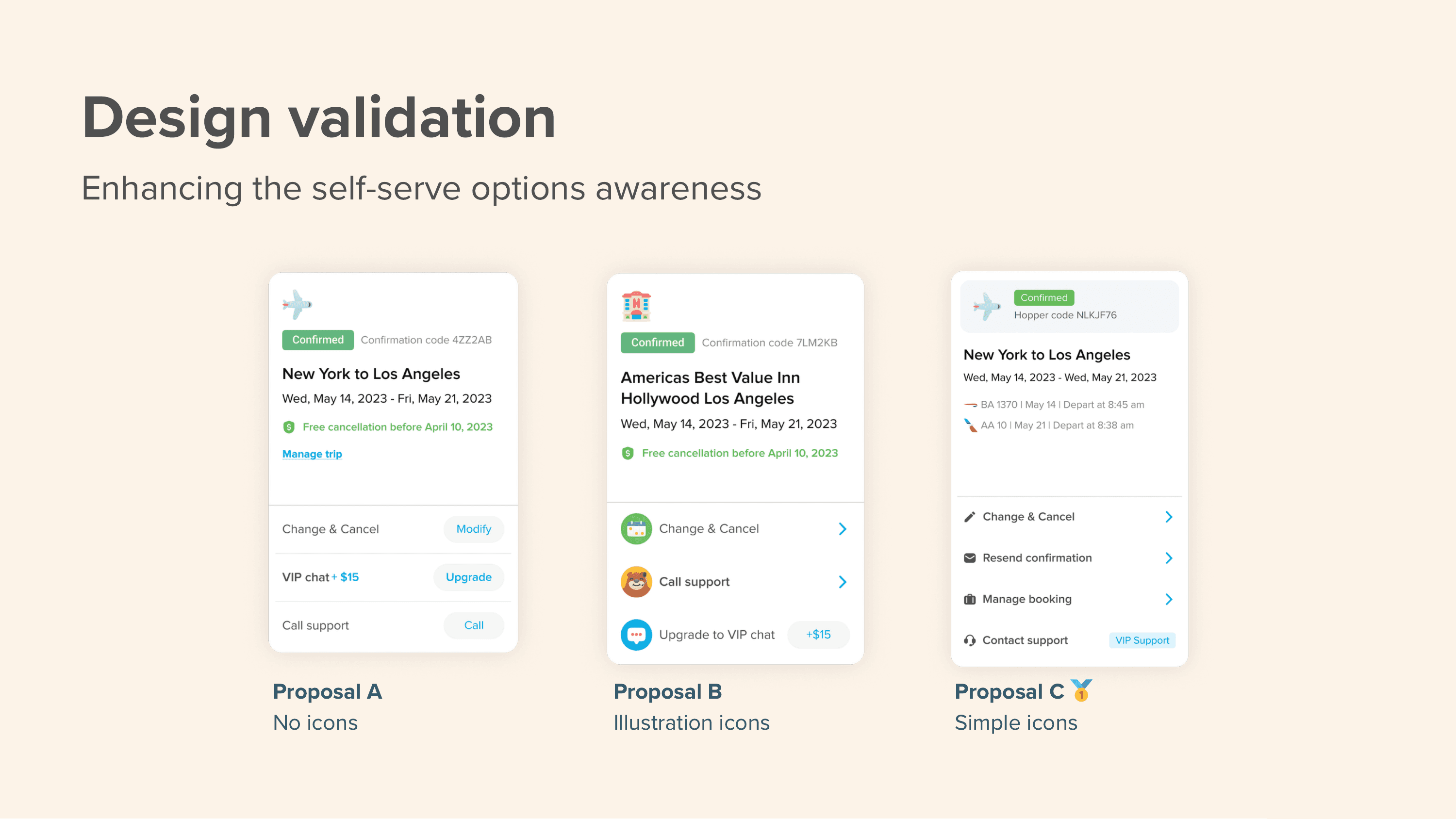
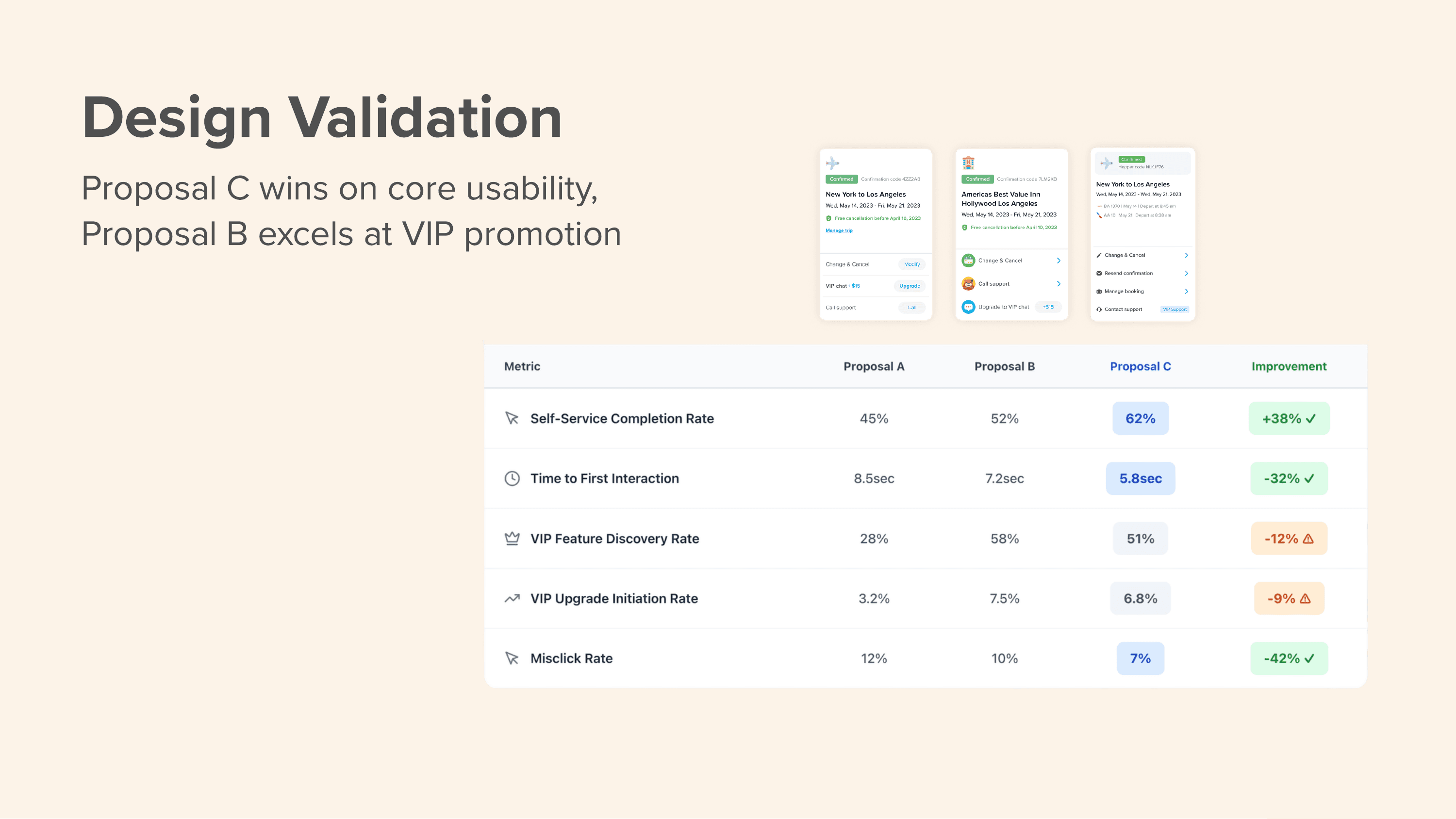
To clearly surface each booking and its self-service options at a glance, I designed the trip card as the primary action surface. The challenge was finding the right balance between functional clarity and brand expression, so I ran an A/B/C test across three icon treatments and let the data make the call.
Proposal C — simple line icons — won every core usability metric: completion +38%, time-to-first-interaction −32%, misclick rate −42%. Proposal B drove higher VIP feature discovery, but at significant cost to baseline interaction speed. We shipped C and treated VIP discovery as a separate problem rather than letting it compromise the primary self-service flow.
Visual & Motion Design
Humanity through the mascot, calm through the palette
Two ideas anchor the visual direction. The bunny mascot brings humanity to a context where users arrive stressed; a soft beige palette establishes calm before anything else is read.
The original Help Center led with a high-contrast red banner — visually loud, emotionally cold. The redesign opens with a soft beige base, generous rounded corners, and subtle card elevation. The bunny, previously absent from the Help Center, returns as an active presence on the page.
Detail 1: The greeting bunny
The bunny slides up into the header as the page loads, while the greeting text types out character by character. The full entrance takes 0.7 seconds — the difference between opening a support ticket and being greeted by someone.
An Easter egg waits underneath. Tapping the bunny triggers a short message and a small gesture: a nod, a glance upward, a squat. Repeats are capped at two in a row, so the moment stays a moment.
Detail 2: Trip card icon animations
Each trip type has its own entrance animation when the card scrolls into view. The plane angles up from the lower left and straightens into place. The hotel pops into scale with a slight bounce. The car slides in from the left. Each runs for 0.7 to 1.0 seconds and plays once per session.
The carousel itself responds to drag with rubber-band resistance at the boundaries. Pull past the last card and resistance ramps up; release and the rail snaps back with a spring. The physics match the native iOS feel users already trust.
Detail 3: Finishing touches
A sliding highlight on the tab switcher lets the active state move fluidly between Help Center and Messages, instead of cutting between them.
At the bottom of the page, a second bunny sits and breathes — scaling 1.5% over a four-second loop. It's the kind of detail most users won't consciously notice, but it keeps the page feeling alive.
Emotional design is what earns brand trust
The part I'm proudest of in this project isn't the information architecture restructure work. It's that we got to push the redesign past "easier to navigate" and into something that actually feels like Hopper.
Help centers are places users land when something's gone wrong. Most of the time, the entire surface is transactional. I sketched several visual directions and walked through each with our brand designer, asking the same question every round: which version feels most like Hopper and enhancing the brand image? The one we landed on leans into the bunny mascot, the soft palette, and small playful moments, turning a screen users dread visiting into one that feels a little more human.
The team's favorite detail is the Easter egg: tap the bunny and a different short phrase pops up. It doesn't move the needle on resolution rate. It just makes the surface feel a little less like a help desk and a little more like the rest of the app.
Data-informed, even on the parts that feel like taste
Data-informed design is a principle I keep coming back to. Design is subjective: what makes one direction "better" than another depends on what you're trying to do. That subjectivity makes design easy to debate, and hard to settle.
The trick is finding ways to let evidence into the conversation, even on the parts that feel like taste. The trip card icon test is a small example but strong. What I haven't tackled yet is bringing the same rigor to motion. Animation timing, the necessity of an animation and the impact of the animation, those decisions are still mostly intuition. Next time, I'd like to set up structured measurement on motion design as well.
Aligning scope with adjacent teams earlier would have enhanced holistic experience
One thing I'd love to change is aligning scope with adjacent teams earlier, before locking the redesign. This project solved for itinerary management and brand trust, while a separate team was also developing a similar itinerary-management feature but not the entire page. There wasn't enough runway to coordinate, and integrating so early would have affected each team's own impact, so we chose to ship separately for the first redesign. The integration may happen after the launch. From the user's perspective, though, the trip-management experience could have been even more holistic if the two features had been merged.